Working alone safety matters for tradies who travel between jobs, enter unfamiliar properties, accept after-hours callouts or complete work without a coworker nearby. A practical system should help the tradie communicate clearly without creating more phone calls, more administration or permanent location sharing.
NevaSolo is a lone worker safety app that gives tradies practical tools for sharing client trips and alerting trusted contacts during an emergency.
Used alongside risk assessments, safe work procedures and an agreed emergency response, NevaSolo can add a practical communication layer to working alone safety.
Why Working Alone Safety Matters for Mobile Tradies
A plumber, electrician, locksmith, mobile mechanic, carpenter or air-conditioning technician may visit several locations in one day. Some jobs are in private homes. Others are at vacant properties, rural blocks, industrial areas or sites with no one else nearby.
The risks can also change throughout the day. A routine appointment may involve:
- a long drive;
- a locked gate or difficult property access;
- an unfamiliar dog;
- working in a roof space;
- sharp tools or electrical hazards;
- manual handling;
- an isolated work area; or
- working after dark.
Working alone safety therefore includes planning how clients will know when the tradie is arriving, deciding who should be contacted if something goes wrong and making sure those people know what to do.
NevaSolo supports two separate needs:
- Share Trip is for coordinating an arrival with a client.
- Emergency Mode is for alerting trusted contacts when urgent awareness is needed.
Keeping those purposes separate helps the tradie share only the information required for each situation.
NevaSolo Share Trip creates a temporary journey session. The tradie sends a secure link to the person they are meeting. The client can open the link without downloading the app, creating an account or being added to the tradie’s trusted-contact network.
While the trip is active, the client can see the tradie’s live travel progress, how far away they are and when they are getting close. When the tradie arrives or ends the trip, the link stops working and live location sharing ends.
Share Trip is focused on travel progress. It does not capture audio, video or photos. It gives the client useful arrival information while keeping the sharing temporary and limited to that appointment.
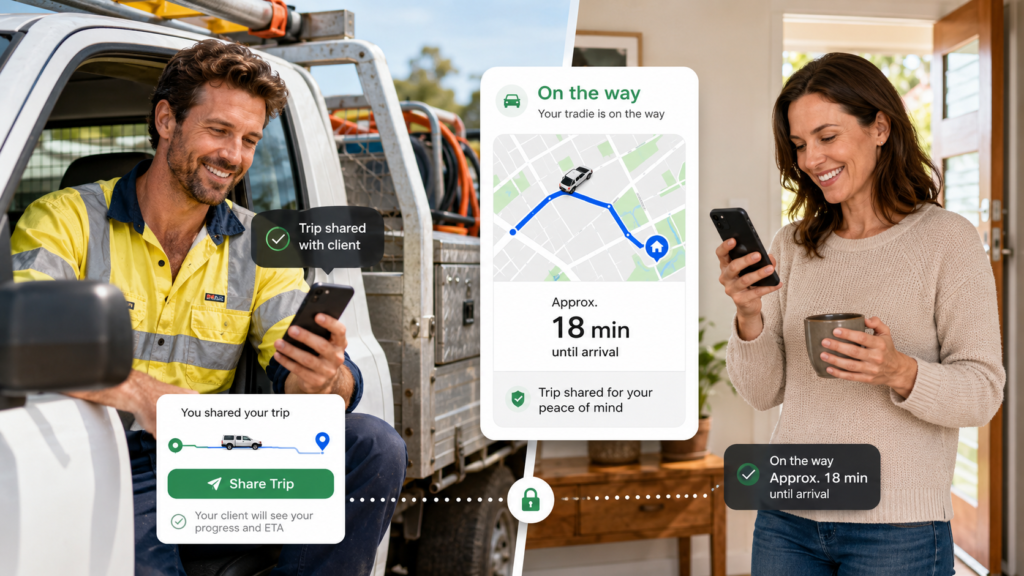
The following realistic scenarios show how Share Trip could benefit both the tradie and the client during an ordinary working day.
1. A Plumber Whose Previous Job Runs Overtime
A plumber has told the next client that arrival should be between 2:00 pm and 3:00 pm. The current repair becomes larger than expected, traffic builds and the plumber is now running late.
The client may normally call or text several times to ask whether the plumber is still coming. The plumber then feels pressure to respond while travelling or has to pull over to send another estimated arrival time.
Before starting the drive, the plumber opens Share Trip and sends the client the temporary link.
The client can see that the plumber is on the way and when the vehicle is getting close. The client uses that time to secure the dog, clear access to the leaking pipe and move a car out of the driveway.
For the plumber, the benefit is fewer interruptions and less time spent sending updates. For the client, the benefit is certainty and enough notice to prepare the property.
When the plumber arrives, the trip ends and the client’s access ends with it.
This is a simple working alone safety and customer-service improvement: the tradie can focus on the road while the client receives useful information without becoming a permanent contact.
2. An Electrician Travelling to a Rural Property
An electrician is booked to inspect a switchboard at a rural acreage. The driveway is long, the entrance is easy to miss and the gate is normally locked. The client needs to meet the electrician at the gate but does not want to wait outside for an uncertain period.
The electrician sends a Share Trip link before leaving the previous job.
The client can see when the electrician is approaching, unlock the gate, secure livestock and make sure the switchboard area is accessible. The electrician is less likely to miss the entrance or lose time waiting for access.
The client does not need the NevaSolo app and does not have to be added to the electrician’s trusted contacts. Access is limited to the active trip and finishes when the electrician arrives.
For the electrician, Share Trip supports working alone safety by reducing distractions and making access to an unfamiliar property more predictable. For the client, it reduces waiting and helps the appointment begin smoothly.
3. A Mobile Mechanic Responding to a Roadside Breakdown
A customer’s vehicle has broken down in an industrial area. The customer is anxious, unsure how long assistance will take and concerned that the mechanic may not find the correct entrance.
The mobile mechanic starts Share Trip and sends the temporary journey link before travelling.
The customer can see that the mechanic is moving towards the location and when help is close. Instead of standing near traffic looking for the mechanic’s vehicle, the customer can remain in a safer waiting position.
The mechanic receives fewer calls while driving and can concentrate on reaching the customer. Once the mechanic arrives, the trip finishes and the customer no longer has access to the live location.
The client receives reassurance and a more professional service experience. The mechanic gains a communication tool that supports both road safety and working alone safety.
4. An Air-Conditioning Technician Meeting a Tenant
An air-conditioning technician is attending a rental property. The property manager arranged the booking, but the tenant must be home to provide access.
The technician sends the tenant a Share Trip link before travelling.
The tenant can see when the technician is getting close and use that time to:
- secure pets;
- move furniture away from the indoor unit;
- clear access to the outdoor equipment; and
- make sure someone is available to open the property.
The technician does not have to send separate updates to the tenant and property manager. There is also less chance of arriving while the tenant is away from the property.
For the technician, the trip link reduces administration and lost time. For the tenant and property manager, it creates clearer coordination and a better appointment experience.
5. An After-Hours Callout to a First-Time Client
A locksmith, plumber or electrician accepts an urgent evening callout from a client they have never met.
The client wants reassurance that the tradie is genuinely on the way. The tradie wants to provide useful arrival information without giving a stranger continuing access to their movements.
The tradie starts Share Trip and sends the secure link. The client can follow the active journey and prepare to provide access. When the tradie arrives, the link ends.
The client receives confirmation that assistance is approaching. The tradie retains control over when sharing starts and stops, which is an important part of working alone safety during first-time and after-hours appointments.
Step 1: Start the Trip Before Driving
Open NevaSolo and begin a Share Trip session while the vehicle is parked and you are ready to leave.
Step 2: Send the Temporary Link
Send the secure link to the client by text message or through your normal booking system.
A simple message could say:
Hi, I’m on my way to your appointment. You can follow my arrival here: [Share Trip link]
Step 3: Let the Client Follow the Journey
The client opens the link in a browser. They do not need to download NevaSolo, create an account or join the tradie’s trusted-contact network.
The client can check the trip when needed instead of repeatedly calling or messaging the tradie.
Step 4: Finish the Trip on Arrival
When the trip ends, the client’s live access finishes.
The client receives the information needed for the appointment without continuing location access afterwards. The next client can receive a separate link for a separate trip.
How a Lone Worker Safety App Can Help Tradies During an Accident
Share Trip coordinates the journey to a client. NevaSolo Emergency Mode supports a different part of working alone safety: alerting people the tradie trusts when something is wrong.
When Emergency Mode is activated, NevaSolo notifies the user’s selected trusted contacts and shares the user’s emergency status and live location. While the emergency is active, the app may also capture audio, video or photos to provide context.
When the user ends Emergency Mode, live sharing stops and no new emergency evidence is captured.
Trusted contacts may include:
- a partner;
- a family member;
- a coworker;
- a business owner or supervisor;
- another contractor working nearby; or
- another person the tradie trusts to respond appropriately.
The client who received a Share Trip link does not automatically become part of that trusted network. The client only receives access to the individual trip link sent to them.
A Working Alone Safety Story: An Accident at a Vacant Property
A carpenter is working alone at a vacant renovation property. While carrying materials, the carpenter slips, suffers a deep cut and cannot safely drive.
No client is on site, and the next person is not expected for several hours.
The carpenter is conscious and able to reach the phone, so they activate Emergency Mode. Their trusted contacts receive an alert and can see the live location.
One trusted contact is the carpenter’s partner. Another is a contractor working in the same area.
The nearby contractor calls the carpenter, confirms that assistance is needed and travels to the property. The partner also has the location and can arrange further help based on the carpenter’s condition.
The value of Emergency Mode in this situation is clarity. The trusted contacts know that the alert is an active emergency, know where the carpenter is and can make a faster decision about the response.
This strengthens working alone safety by giving trusted people useful information when the tradie is able to activate the emergency session.
Another Example: An Electrician Injured at a Rural Job
An electrician is working at a rural property and falls while moving equipment. The client is elsewhere on the acreage and cannot hear the electrician calling for help.
The electrician activates Emergency Mode.
A trusted coworker receives the alert, sees the location and calls immediately. When the electrician does not answer, the coworker contacts the property owner and explains where the electrician appears to be.
The owner reaches the electrician and assesses what help is required. If the injury appears serious, the owner or trusted contact can call Triple Zero and provide the location.
Emergency Mode does not need to determine the exact injury. Its role is to notify the trusted network, share the location and make it clear that immediate attention may be required.
Choose Trusted Contacts for Working Alone Safety
Emergency Mode is most useful when the working alone safety response has been agreed in advance.
Choose contacts who are likely to notice an alert and take appropriate action. Consider whether each trusted contact:
- usually keeps their phone nearby;
- understands the type of work you do;
- knows the areas in which you normally work;
- could contact someone close to your location; and
- will respond appropriately rather than assuming someone else will handle it.
Agree on the response one step at a time.
Step 1: Call the Tradie
The trusted contact should call the tradie immediately to find out what has happened and what assistance is required.
Review the live location, emergency status and any available context.
Step 3: Contact Someone Nearby
Contact the client, property owner, site manager, coworker or another person close to the location when appropriate.
Step 4: Arrange Assistance
Arrange for someone nearby to attend when it is safe and appropriate to do so.
Step 5: Contact Emergency Services
Call Triple Zero on 000 when there is immediate danger, a serious injury or urgent police, fire or ambulance assistance is required.
Test the process before relying on it. Confirm that trusted contacts recognise NevaSolo notifications, know where to find the emergency information and understand their role.
Build NevaSolo Into a Broader Working Alone Safety Routine
A personal safety app works best as one part of a broader system. Before attending a job alone, the tradie or business should consider the location, task, travel, communication coverage, hazards, emergency access and who will know where the worker is.
Step 1: Review the Job and Location
Check the address, type of property, client details, expected work, access conditions and anticipated finish time.
Step 2: Identify the Hazards
Consider the tools, equipment, substances, work environment and tasks involved. Confirm which controls and safety documents are required.
Step 3: Confirm Access Arrangements
Ask the client about gates, parking, pets, security systems, site contacts and any areas that may be difficult to reach.
Step 4: Prepare the Phone
Charge the phone before leaving. Carry a power bank for remote, after-hours or extended work.
Use Share Trip when the client would benefit from temporary arrival visibility.
Step 6: Activate Emergency Mode When Attention Is Required
Use Emergency Mode when something has gone wrong and trusted contacts need to pay attention immediately.
Step 7: Follow the Business’s Emergency Procedure
Follow the documented incident response, first-aid and emergency arrangements for the work.
Step 8: Review Incidents and Near Misses
Record what happened and consider whether risk controls, training, contact arrangements or procedures should be improved.
Safe-R Outcomes provides mobile workplace safety documents for businesses whose workers travel between jobs and work across changing locations. The documents cover activities, hazards, risks and controls commonly encountered by mobile workers.
Combining documented procedures with practical communication tools creates a more complete working alone safety approach than relying on informal text messages or hoping someone notices when a job runs late.
The distinction between the two features is important.
Share Trip can help the client:
- confirm that the tradie is on the way;
- see when the tradie is getting close;
- prepare the property;
- secure pets;
- unlock gates;
- arrange parking or access; and
- avoid waiting without an update.
The client receives a temporary trip link. They do not have to become one of the tradie’s trusted contacts.
Share Trip can help the tradie:
- reduce calls and messages while driving;
- provide a more professional arrival experience;
- reduce missed appointments;
- coordinate access to unfamiliar properties;
- avoid permanently sharing a location with clients; and
- keep each client trip separate.
Emergency Mode Is for Trusted Contacts
Emergency Mode can help selected trusted contacts understand:
- that an emergency has started;
- where the tradie is;
- that immediate attention may be required; and
- what context is available during the active emergency.
This separation allows the tradie to use a temporary client link for appointment coordination while maintaining a separate, private emergency network.
Download NevaSolo
Learn more about the NevaSolo personal safety app for tradies and contractors.
Explore the two features discussed in this article:
The NevaSolo personal app is available for Apple and Android devices.
A Practical Communication Layer for Tradies
Working alone safety depends on planning, clear communication and a response that people understand.
For client appointments, Share Trip gives the client temporary arrival visibility without requiring an app, an account or a place in the tradie’s trusted network. The client can prepare for the appointment while the tradie can travel with fewer calls and interruptions. Access ends with the trip.
For accidents and urgent situations, Emergency Mode alerts selected trusted contacts and gives them the location and context needed to decide what action to take.
NevaSolo can help tradies communicate more clearly before arrival and during an unexpected incident. Used with suitable safety documents, risk controls and emergency procedures, it becomes a practical addition to working alone safety for mobile trades and contractors.
Important: NevaSolo is a communication and coordination tool. It does not replace police, medical or emergency services. In a life-threatening situation, contact Triple Zero on 000 as soon as possible.